Planning a TV Wall or Home Theater Before the Crew Arrives
The decisions worth making before anyone opens a wall for your TV, speakers or cameras.
September 30, 2026 · 4 min read
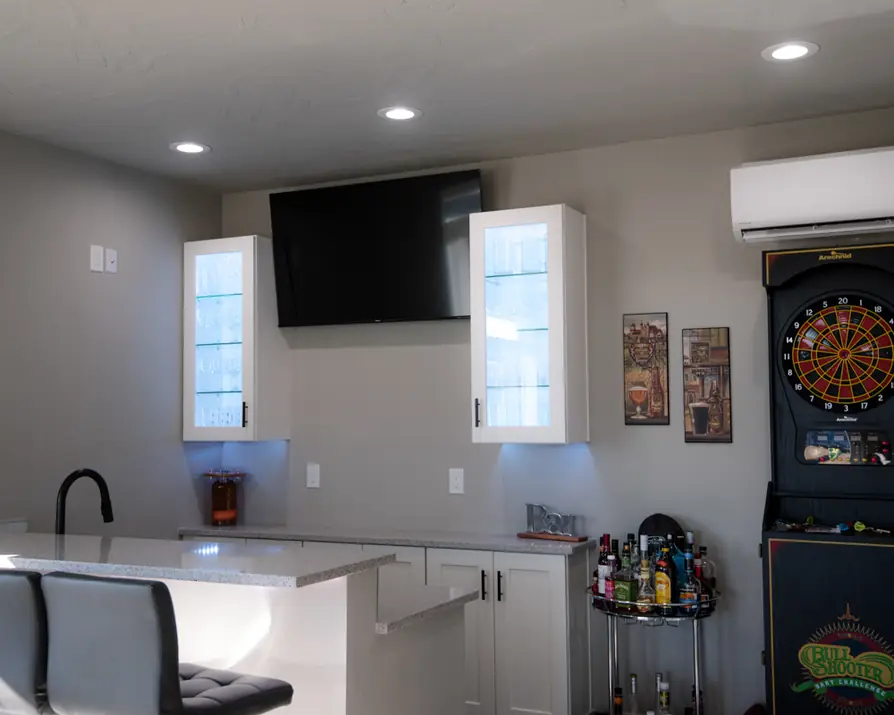
A wall-mounted TV looks like a simple project until you start asking where the power comes from, where the cables go, and what happens to the soundbar, the streaming box and the game console. The best home theaters get planned on paper first. The decisions below are the ones to make before the low-voltage crew from Columbia Basin Satellite & Electric shows up, so the visit is spent on installing and not on guessing.
You don't need every answer. You need to have thought about each question, because most of them are easier and cleaner to settle before a wall is opened than after.
Where the TV goes and how it mounts
Start with the wall. Pick the spot by sitting where you'll actually watch. Check the viewing height from the couch, look for glare from windows at different times of day, and decide whether the TV is going above a fireplace. A fireplace wall sits high and can run warm, so mention it to the crew. Heat and viewing angle both affect the choice.
Then think about the mount. A fixed mount sits flat against the wall. A tilting mount angles the screen down, which helps when it sits high. A full-motion mount swings out, which suits a corner or a room with two seating areas. The company can supply TV mounts, so you can ask for a recommendation based on your TV size and your wall. What the technician needs from you is the TV's make and size, plus what the wall is made of: drywall over studs, brick, stone, or a built-in cabinet.
Power and cables are the other half. Many people want the cords hidden inside the wall with an outlet right behind the TV. That's electrical work, and it's one reason an electrician does this kind of job. Tell the crew up front that you want it concealed.
Surround sound and in-wall speakers
Speakers decide how much wire has to be pulled and where it runs. A soundbar needs very little. A surround system needs speaker wire run to the front, the sides and the back, often through walls and ceilings. In-wall and in-ceiling speakers look clean, but they take the most planning, because the wire has to be placed before the speakers can be.
Think about the room as it will be used. Where does the couch sit? Does the seating ever move? A layout that works today can feel wrong if you rearrange next year, and re-running wire later is more work than running it once. Decide on the sound system before the install day if you can. These are the choices to bring:
- How many speakers you want, and whether they're in-wall, in-ceiling or freestanding
- Where the seating sits now, and any plan to move it
- Whether a subwoofer is part of the setup and where it will sit
- Which walls are finished and which are still open
- Whether the room is for movies only or for everyday music too
Where the components live
Behind every nice TV wall is a pile of boxes: the receiver, the streaming device, the game console, maybe a satellite receiver. They have to live somewhere. Some people want them in a closet in the next room. Others want them in a cabinet under the screen. Each choice changes the wiring.
Two practical points. Electronics make heat, so whatever space you choose needs room for air to move. And remote controls need a path to the gear, so a closed cabinet door can cause trouble. Component setup is part of the low-voltage service, so tell the crew what devices you own and which ones you plan to buy.
Smart home devices and security cameras
If you're adding smart home devices or security cameras, this is the best time to say so. Cameras need power and a network connection, and both are easier to provide while a crew is already working in the walls and attic. Walk your property and decide what you want to see: the front door, the driveway, the back gate, the garage. Mention any spots where Wi-Fi is weak.
Smart device setup and security camera and system installation are both on the company's list of low-voltage services. A short list of what each device should do for you is more useful than a list of brand names.
What the company supplies and what you supply
The rule is simple. The company can supply security cameras, smart home products, LED lighting and TV mounts. All electronics need to be supplied by the customer. That means you buy the TV, the speakers, the receiver and the other gear, and the crew installs it. LED lighting is worth a thought here too: a strip behind the TV or lit shelving can finish a room, and it can be planned with the same visit.
For larger jobs, the company sets up a site survey and gives you a formal project bid. If something stops working after the install, a technical support service call is billed at the hourly rate, and the first-hour approach applies: if it can't be fixed in the first hour, the technician talks through what's needed, how long it will take, and the cost of materials.
To talk through a TV wall, a theater room or a camera system, call Columbia Basin Satellite & Electric at (509) 783-7283 or email solutions@callcbse.com. The office in Kennewick is open Monday through Friday, 8 to 5.
Columbia Basin Satellite & Electric, (509) 783-7283
Call (509) 783-7283More articles
How a Residential Electrical Service Call Works
Here is what to expect when an electrician comes to your house, and how to get ready so the visit goes smoothly.
Questions to Settle Before Adding a Home EV Charger
A home charger is mostly a wiring project, so the best questions are about your garage, your driveway and your panel.